Root here. Branch everywhere.
Your business has a lot of branches. Give them one home.
Roots HQ is a connected small-business management platform that brings the operation behind every sales channel into one place.
Roots HQ is not another place to sell. It's the headquarters that already knows about your inventory, customers, orders, marketing, website, sales channels, expenses, events, vendors, and reports — so entering something once means it's there everywhere it needs to be.
- Not another marketplace — the headquarters behind all of them
- Enter it once. It shows up everywhere it should.
- Export your contacts, sales, mileage, and tax records as CSV whenever you like.

One record, everywhere it matters
Enter it once. Let Roots remember the rest.
The value of Roots HQ isn't a pile of tools — it's that they know about one another. What you enter for one purpose becomes available everywhere it's useful, automatically.
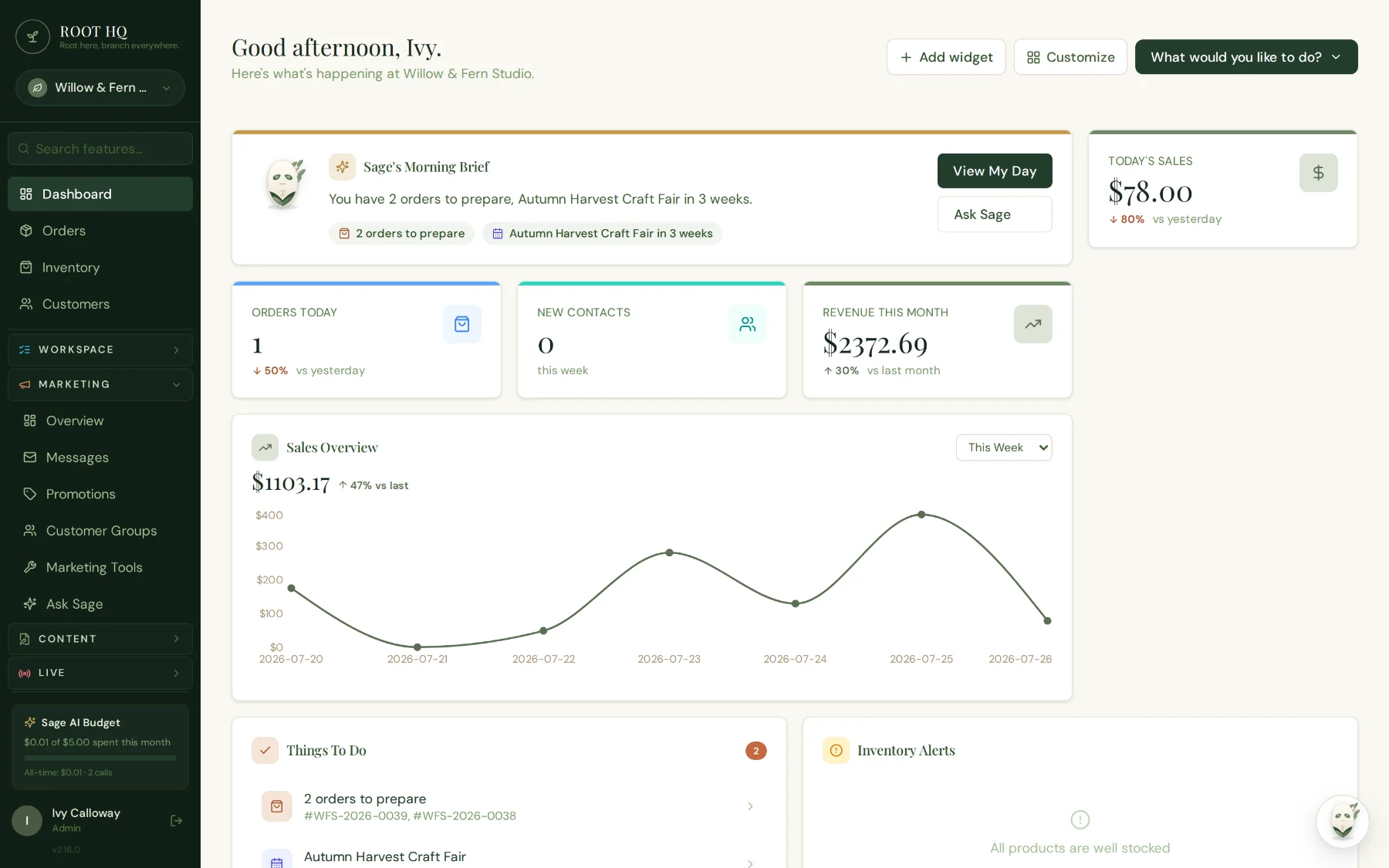
Sage's morning brief, today's sales, and what to do next — pulled from every part of your business onto one dashboard.
See the rest of the platform →Run one event
- Event
- Checklist
- Mileage
- Expenses
- Sales
- Payouts
- Profit report
Sell to one customer
- Customer
- Order
- Rewards
- Marketing
- Purchase history
List one product
- Product
- Inventory
- Website
- Sales channels
- Orders
- Reporting
Watch it work
A recipe, entered once.
The clearest way to show what "enter it once" means is to watch one thing travel. This is The Hearth — recipes and digital cookbooks — from a recipe pasted out of a notes app to a cookbook built from recipes that already existed. No sound, and nothing sped up past the point of being readable.
- 0:00The HearthRecipes and digital cookbooks, sitting in Content alongside your website and your Grove posts. The dashboard shows every recipe, how many cookbooks you have built, and how they are being read.
- 0:22Smart PasteYou already wrote the recipe somewhere — ChatGPT, Claude, Notes, a Word document, an email. Paste it in and The Hearth picks out the title, times, servings, oven temperature, ingredient sections and numbered steps. It shows you what it found before anything is saved, and keeping your plain text exactly as written is a real option.
- 0:52Make it yoursPlain text stays the fastest way to enter ingredients. Structured mode adds sections you name yourself, an optional brand, and a link to a product you sell — which is what lets the public recipe offer it for sale. Images come from your Media Library; there are no image addresses to copy.
- 1:16Build a cookbookChapters you name, filled with recipes you already have. A cookbook points at your recipes — it never copies them. The same recipe can sit in several cookbooks, changing it once updates all of them, and removing it from a cookbook (or deleting the cookbook outright) never deletes the recipe.
Why this one is worth a minute
A cookbook in Roots HQ does not hold copies of your recipes. It points at them. The same recipe can sit in as many cookbooks as you like, and editing it once updates it in all of them — the same idea that runs through the rest of the platform, just somewhere you can watch it happen.
Removing a recipe from a cookbook — or deleting the cookbook entirely — never deletes the recipe.
See the rest of the platform →Branch out, on your terms
Keep the platforms that already work for you.
Roots HQ does not replace Whatnot, eBay, Square, Palmstreet, Facebook, Etsy, TikTok Shop, Shopify, your in-person markets, or your own website. Those are branches of your business — Roots HQ is the headquarters they connect back to. Here's exactly what that means for each one today, no exaggeration.
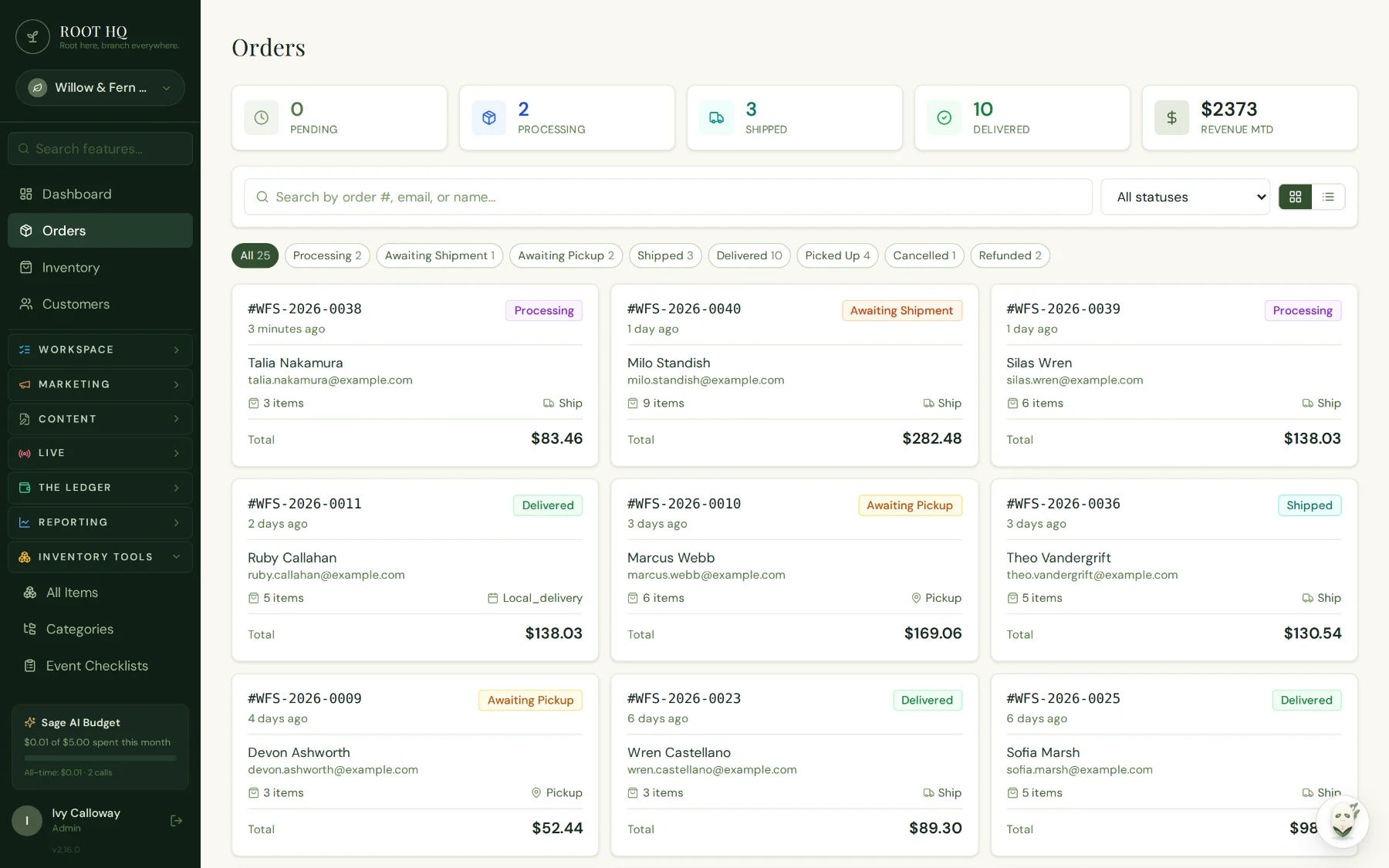
Orders from however you sell land in one queue — ready to ship, hand off for pickup, or send out for local delivery.
See how fulfillment works →Your own website
NativeThe storefront is part of Roots HQ itself — your catalog, orders, and customers live here first.
In-person markets & events
NativeEvent checklists, mileage, cash-drawer verification, and card payments are built in, not bolted on.
Square
NativeReal in-person card payments — Tap to Pay and keyed entry — connected directly to your invoices.
Whatnot
CSV importBring your Whatnot sales in for unified reporting. A live order sync isn't available — Whatnot's seller API isn't open yet.
eBay
Built, not yet connectedOrder-syncing is built in the code but not turned on for any store yet. For now, sell and fulfill on eBay directly and import sales for reporting.
Etsy
Built, not yet connectedSame as eBay — the sync groundwork exists but isn’t connected yet. Import your Etsy sales for reporting in the meantime.
Shopify
CSV importNo dedicated live sync — list your products on Shopify as usual and import sales for reporting.
Palmstreet
Manual workflowPalmstreet has no public seller API to build against, so listings are recorded manually; sales can still be imported for reporting.
Facebook
Use alongsideNot a connected sales channel. Roots HQ can cross-post your blog and announce when you're live — selling itself stays on Facebook.
TikTok Shop
Use alongsideNot yet supported. Keep selling there directly and track it manually alongside everything else for now.
- Native
- Built directly into Roots HQ.
- CSV import
- Real, works today — not live/automatic.
- Manual workflow
- No API exists yet — recorded by hand.
- Built, not connected
- Code exists; no live credentials yet.
- Use alongside
- Not connected — sell there directly.
One headquarters, every branch
Everything your business runs lives at the center.
Roots HQ holds the operational core of your business. The channels you sell on and show up at branch out from it — and every one of them feeds back into the same headquarters.
Roots HQ
Your headquarters holds
- Inventory
- Customers
- Orders
- Marketing
- Expenses
- Reports
- Events
- Vendors
- Sage
- Your website
- Whatnot
- eBay
- Square
- Markets & events
- Invoices
- Social selling
- Other channels
Root here. Branch everywhere.
The strongest reason to switch
One action can update your entire business.
Pick an example. Watch one action ripple through the parts of your business that actually depend on it — not because someone built an automation for it, but because it's all the same connected data underneath.
You work one market. Roots does the rest.
Step 1 · Event
You add a Saturday market to the calendar.
Step 2 · Checklist
A reusable packing checklist attaches to it — including a cash-drawer step.
Step 3 · Mileage
Log the drive once; it ties back to this event automatically.
Step 4 · Inventory
What you bring and sell adjusts stock in real time.
Step 5 · Sales
Every sale — card or cash — records against the event and the product.
Step 6 · Cash Drawer
Count the drawer at the end of the day; the checklist verifies it against what should be there.
Step 7 · Expenses
Booth fees, supplies, and mileage flow into this event’s real cost.
Step 8 · Profit Report
One number: what this event actually made you, after everything it cost.
You list one product. It shows up everywhere it should.
Step 1 · Product
You create the product once — photos, price, description.
Step 2 · Inventory
Stock count becomes the single source of truth for that item.
Step 3 · Website
It’s live on your storefront, ready to sell.
Step 4 · Sales Channels
Wherever you sell it from, the same record is behind it.
Step 5 · Orders
Every order against it lands in one fulfillment queue.
Step 6 · Reporting
Sell-through, margin, and channel mix roll up automatically.
You make one sale. The relationship remembers it.
Step 1 · Customer
A record is created (or matched) the moment they buy.
Step 2 · Order
The order lands on their history — no separate spreadsheet.
Step 3 · Rewards
Points or loyalty progress update, if you use them.
Step 4 · Marketing
They become eligible for the segments and campaigns built on real purchase behavior.
Step 5 · Purchase History
Everything they’ve ever bought is one click away the next time they reach out.
You restock from one vendor. Your margins stay honest.
Step 1 · Vendor
You record who you bought from and what it cost.
Step 2 · Cost of Goods
That cost attaches to the product, not a spreadsheet on the side.
Step 3 · Inventory
Restocked units come in at their real cost.
Step 4 · Margins
Every sale of that product reflects what it actually cost you.
Step 5 · Vendor Scorecard
Reporting shows which vendors and products are actually worth reordering.
Grow at your own pace
Powerful doesn't have to mean overwhelming.
You don't have to turn everything on to get started. Roots HQ is the same connected system whether you're using five pieces of it or all of them — you just grow into more as your business does.
Where most businesses start
Start simple
- Products
- Customers
- Orders
- Basic reports
- Your website
Where most businesses grow into
Grow into more
- Events
- Marketing
- Rewards
- Expenses
- Vendors
- Payouts
- Reminders
Where the ambitious end up
Expand when ready
- Advanced reporting
- Multiple sales channels
- Team roles & permissions
- Reusable checklists & templates
- More integrations
- Sage-assisted tasks
Your headquarters has a guide
Meet Sage.
She isn’t another chatbot floating beside your business.
She’s inside it.
Sage already understands the Roots HQ environment — your products, customers, orders, and reports — because she reads the same connected data you do. You don’t have to explain your business to her first.
Ask her anything
Sage answers using your real business data — sales, inventory, customers, orders — not a canned script. When she needs something outside Roots HQ, she can look it up.
Daily insights
Not AI guesswork — a rules engine that checks your real numbers every day: low stock, best sellers, lapsed customers, revenue milestones, and flags what's worth a look.
Guided walkthroughs
Ask "how do I…" and Sage can point — a floating marker on the exact button or field for that task, wherever it lives in the app today.
Sage drafts, suggests, and flags — she never sends an email, changes a price, adjusts inventory, or moves money on her own. Anything she proposes comes back to you to review and approve first.
Meet Sage, in full →Built around your business
Make it yours.
Roots HQ is a headquarters, not a template. It takes on your brand, runs with the modules your business actually uses, and grows in whatever direction you do.
Your storefront, your brand
Colors, logo, and a theme preset — or a fully custom palette — on the website your customers see.
Only the modules you use
Turn on what your business needs. Nothing you don’t use is in your way.
Roles that fit your team
Add teammates with scoped permissions as you bring people on.
Room to grow
A bigger catalog, more sales channels, deeper reporting, and wider marketing — the same system, further along.
Give your branches one home.
Root here. Branch everywhere.